
Free Form Letter
Don’t let writer's block take control. Download our Form Letter template and save time and effort to write your correspondence. Make sure your business letters are consistent in layout and tone.
Trusted by 1,658 users.
Who is the recipient of this letter?
Fill forms in a few steps
Save, print & download
Done in 5 minutes
What Is a Form Letter
A Form Letter is a pre-written document that can be customized for various purposes without needing to be rewritten each time.
This type of business document is especially useful in scenarios where the same message must be addressed to multiple recipients, allowing for personalized adjustments such as names, dates, and specific details to be inserted as needed.
Form Letters streamline the process of personalizing bulk communications, making it an efficient tool for organizations and individuals who want to maintain consistent, professional communication with a large audience.
When Should You Use a Form Letter
Form letters are a versatile tool in both professional and personal contexts, ideally suited for scenarios where consistency and efficiency are paramount.
Knowing when to use a Form Letter can save you time and ensure your messages maintain a professional standard.
Here are several situations where employing a Form Letter might be particularly beneficial:
- Mass communication: Sending out information that needs to reach a large number of people while ensuring uniformity in your message.
- Customer inquiries and responses: Answering common questions regarding policies, office hours, or services.
- Human resources processes: Crucial for handling recruitment, from acknowledging application receipts to scheduling interviews and issuing employment offers.
- Legal and formal notifications: Complying with legal standards. Examples include notifying tenants of lease terms or informing about legal actions.
- Marketing and promotional campaigns: Reaching out to a broad audience with offers, promotions, or invitations.
- Acknowledgments and thank-yous: For donations, volunteer work, or after events.
It’s important that while the base content remains consistent, sufficient customization is made to address the recipient directly and relevantly, enhancing the personal connection and effectiveness of the communication.
Sample Business Letter
Before you begin drafting your document, reviewing a well-crafted example can be invaluable.
Check out the business letter sample below to get a clearer idea of how to structure your Form Letter:
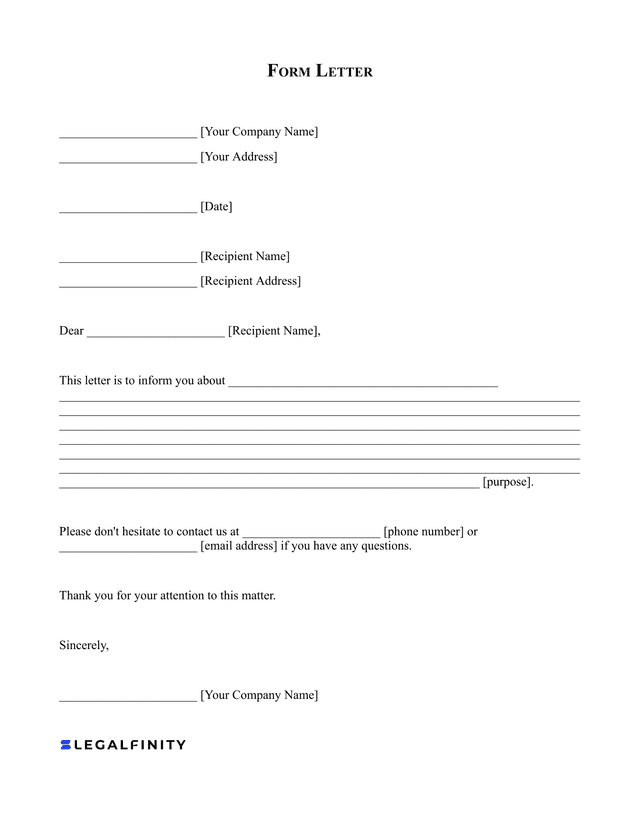
How to Write a Business Formal Letter
To create your own Form Letter, follow these straightforward steps to ensure it’s effective and professional:
- Identify the purpose: Begin by clearly defining the purpose of your letter. Understand the primary message you want to convey or the action you hope to prompt from the recipient.
- Draft an outline: Create a general outline of your letter that includes sections such names, addresses, dates, and other relevant information.
- Personalize key sections: While the main body of the letter remains consistent, personalize parts such as the recipient’s name and address, and any specific details related to the purpose of the letter.
- Include clear contact information: Add clear and accurate contact details. This should include your company’s name, address, phone number, and email address, so the recipient knows where to direct questions.
- Keep the tone appropriate: Match the tone of the letter to the relationship with the recipient and the letter’s purpose. A letter to a client might be more formal, while a letter to a long-time vendor might be slightly more casual.
- Proofread and edit: Proofread it for any grammatical or typographical errors. A well-edited letter reflects professionalism and respect for the recipient.
Follow these steps to effectively draft a Form Letter that communicates your
message clearly and professionally, while also allowing for the necessary personalization for each recipient.
Try Legalfinity Now
Instant and complete access to our entire library of legal forms
Edit, download and print in PDF and Word format from any device
Save time and money on legal document creation